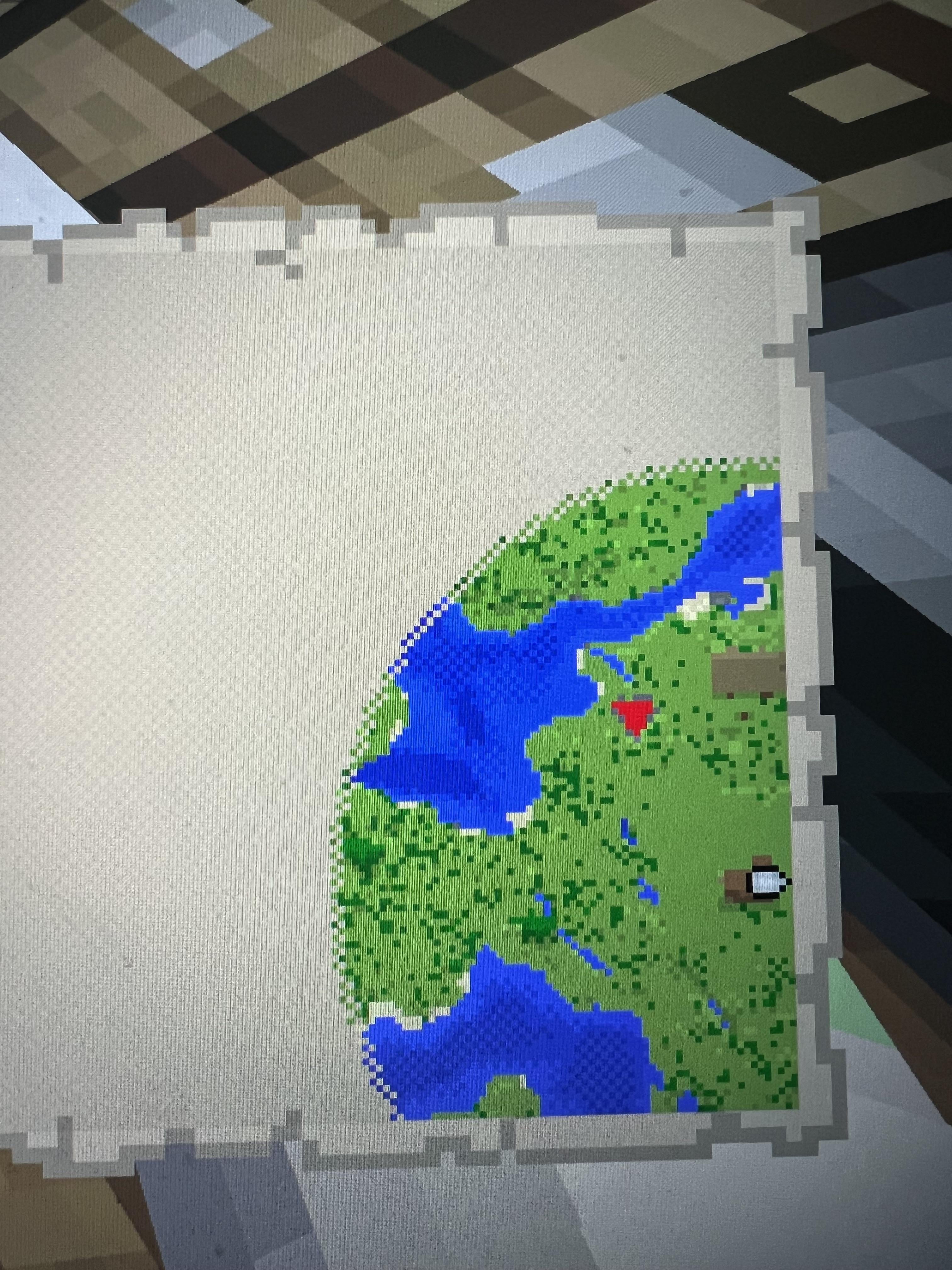
I want the village/ houses to be in the middle of the map but when I open it, it’s on the edge. Is there a way to centre it? Or how do I make it in the middle?
If I’m not mistaken maps go by chunks, I think a normal sized map is 8×8 chunks, but if you use a cartography table you can make the map display up to 128×128 chunks. Maps get less detailed the bigger you make them (I think there’s about 4-5 levels of map size) but it may be possible if you made it bigger that you could get the village closer to the center, but I’ve never messed with it too much, so I’m not certain
ratat-atat on
You cant. Map layout is predetermined based on the zoomed level of the map.
Dangerous-Quit7821 on
It’s based on your chunks. If what you want isn’t centered on the chunk it won’t be centered on the map.
friendlyseraph on
Nobody else here has told you how to actually fix it. Go right until you’re off the edge of the map (or in the center of the village in your world), make a new Empty Map, then Use the Map. You should be able to see more of the village now.
TriangularHexagon on
a minecraft world has a map grid that all maps are aligned with. you can’t center a map because all maps already are centered and that is by design
GotThatGrass on
Maps are chunk based so there will only be one map for a set of chunks
MGlBlaze on
You don’t! Maps are centered on specific chunks. You can make a new map to be centered on an adjacent chunk, depending on where you make it. But otherwise you can’t change how the maps themselves work.
Feather_Bloom on
Put 4 together on item frames
snosberry_snot on
Here is what you can do. Maybe this is not exactly what you want, but possibly it will do. Make 4 maps in each of the adjacent maps. Then place them in frames next to each other and you will have a very big map with your village in the center.
KaneP89 on
You cant. Any new map will show you the same area when standing withing that area
Agitated_Pear_796 on
Try zooming out to the max like 4/4 in a cartography table. You’ll need 3 papers for maximum zoom out. If it still doesn’t meet your criteria, then make new map
SilverFlight01 on
It’s a chunck-by-chunk map system unfortunately. You can expand the map, and if you’re luck it might result in a map where your house is in the middle

14 Comments
It’s chunk based I believe
If I’m not mistaken maps go by chunks, I think a normal sized map is 8×8 chunks, but if you use a cartography table you can make the map display up to 128×128 chunks. Maps get less detailed the bigger you make them (I think there’s about 4-5 levels of map size) but it may be possible if you made it bigger that you could get the village closer to the center, but I’ve never messed with it too much, so I’m not certain
You cant. Map layout is predetermined based on the zoomed level of the map.
It’s based on your chunks. If what you want isn’t centered on the chunk it won’t be centered on the map.
Nobody else here has told you how to actually fix it. Go right until you’re off the edge of the map (or in the center of the village in your world), make a new Empty Map, then Use the Map. You should be able to see more of the village now.
a minecraft world has a map grid that all maps are aligned with. you can’t center a map because all maps already are centered and that is by design
Maps are chunk based so there will only be one map for a set of chunks
You don’t! Maps are centered on specific chunks. You can make a new map to be centered on an adjacent chunk, depending on where you make it. But otherwise you can’t change how the maps themselves work.
Put 4 together on item frames
Here is what you can do. Maybe this is not exactly what you want, but possibly it will do. Make 4 maps in each of the adjacent maps. Then place them in frames next to each other and you will have a very big map with your village in the center.
You cant. Any new map will show you the same area when standing withing that area
Try zooming out to the max like 4/4 in a cartography table. You’ll need 3 papers for maximum zoom out. If it still doesn’t meet your criteria, then make new map
It’s a chunck-by-chunk map system unfortunately. You can expand the map, and if you’re luck it might result in a map where your house is in the middle
Just move the village obviously