Someone explain to me what all the Inventory_Back.pngs are. I’m trying to make a texture pack and cannot find out for the life of me what half of these are even used for. Couldn’t find any info on the wiki for this either.
Someone explain to me what all the Inventory_Back.pngs are. I’m trying to make a texture pack and cannot find out for the life of me what half of these are even used for. Couldn’t find any info on the wiki for this either.
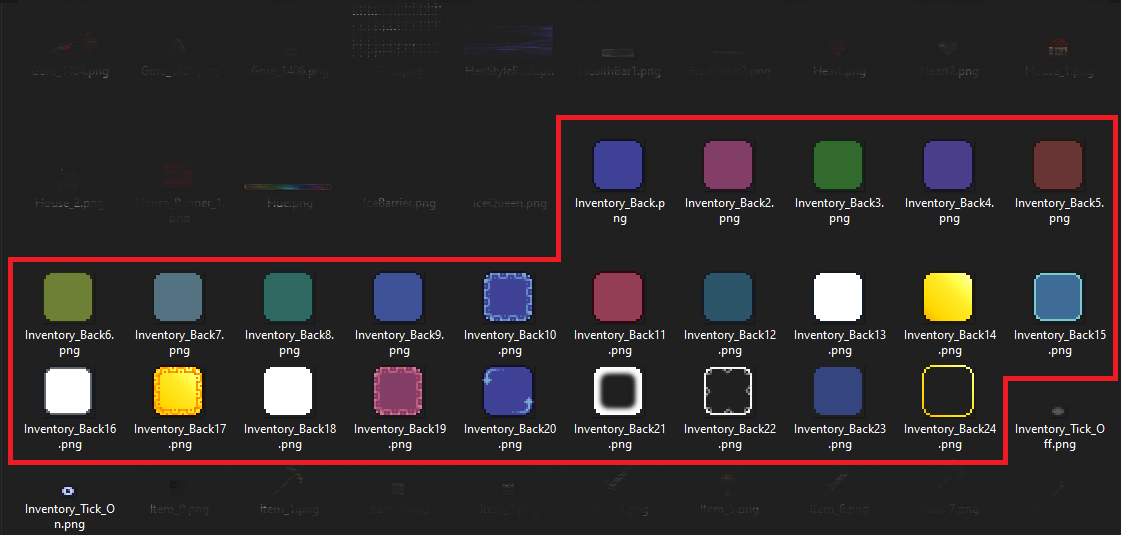
some of these are used for chests I believe, some for favorites, some for highlights, and perhaps most widely, used when clicking the sort inventory/sort chest button
Aluminium-Fail on
inventory, chest’s, bag’s (like piggy bank or void vault), with favorited and highlited variations.
Edit: also shop menus
Arcfluke on
The one with the squiggles in the middle is for ‘Favorite’ items (clicking an item in your inventory while holding ALT key) and the one just below it is the item you have currently selected while using another item/tool via Smart Cursor function.
Flamesoul10 on
Inventory slots. I can’t name all of them, but 10/17/19 are favorite icons, 20 is the selected slot when the player is using auto-torch/the new scroll-thingy i think, and 15 is the active hotbar slot. If you want to know all of them, I’d boot up the game and open every GUI you can, and try things out. Shops, chests, etc. have different colored backgrounds, so thats probably most of them.

4 Comments
some of these are used for chests I believe, some for favorites, some for highlights, and perhaps most widely, used when clicking the sort inventory/sort chest button
inventory, chest’s, bag’s (like piggy bank or void vault), with favorited and highlited variations.
Edit: also shop menus
The one with the squiggles in the middle is for ‘Favorite’ items (clicking an item in your inventory while holding ALT key) and the one just below it is the item you have currently selected while using another item/tool via Smart Cursor function.
Inventory slots. I can’t name all of them, but 10/17/19 are favorite icons, 20 is the selected slot when the player is using auto-torch/the new scroll-thingy i think, and 15 is the active hotbar slot. If you want to know all of them, I’d boot up the game and open every GUI you can, and try things out. Shops, chests, etc. have different colored backgrounds, so thats probably most of them.