
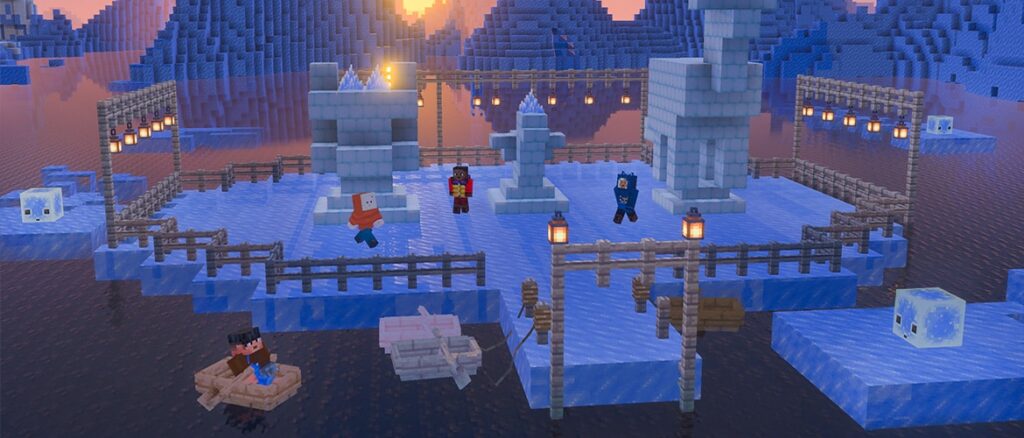
Test more of the upcoming game drop’s features! Build a winter wonderland with a full set of snow bricks, including snow bricks, packed snow brick slabs, snow brick stairs, and snow brick walls. Freeze water into frosted ice blocks by feeding blue ice to a cold sulfur cube. Cool!
And as always, we’re keen to get your feedback on these new features at feedback.minecraft.net, and you can report any bugs you find at bugs.mojang.com.
Drop 4 of 2026 Features
Block sets
Introduced Snow BricksA new snow themed brick block setA decorative blockBuilding block in the same vein as other brick block setsDoes not meltBest tool is Shovel
Blocks
Blocks from the Packed Ice Bricks block set are now correctly located in the Creative inventory, following their Sulfur counterpartsBlocks from the Packed Ice Bricks block set now cause Note Blocks to play the Chime soundPacked Ice Bricks Slabs and Stairs now submerges correctly in lava and waterAll parts of the Packed Ice Bricks set now has names following the same pattern as for the other Bricks Block setsEmits ambient sounds if standing on a block of packed ice
Wandering Traders now sell one Ice Crystal for two Emeralds
Mobs
Husks now convert into Zombies before becoming Frostbites when submerged in Powder Snow (MCPE-243516)Zombies, Husks, and Drowned no longer take freezing damage in Powder Snow (MCPE-243321)Drowned now convert into Zombies before becoming Frostbites when submerged in Powder Snow (MCPE-243517)Villagers and Zombie Villagers now spawn as their snowy variants in Ice CavesSulfur Cubes now have a new archetype: ColdSulfur Cubes with the Cold archetype create Frosted Ice when moving over Water source blocks, similar to the Frost Walker effectOtherwise behaves like the Fast Sliding archetypeObtained by equipping a Sulfur Cube with a Blue Ice block
Sound
Brittle ice shows correct closed captions when cracking
Features and Bug Fixes
Accessibility features
Added new tooltips to 14 misc items and updated existing tooltips for Smithing Templates, workstations, tools and enchantmentsRealms FAQ pages now hints to navigate down when expandedClosed Captions no longer briefly flash and disappear after closing a GUI (MCPE-237489)
Blocks
Fixed the map color of Lightning RodsSuspicious Sand now displays a closed caption when a player brushed it to completion (MCPE-238923)
Gameplay
Fixed an issue where teleporting into the side of a block could trigger effects meant for standing on itEnder Pearl now teleports the player to where it was on the tick before it hit, in order to match Java behaviourTeleporting no longer assumes a player who was on the ground before teleporting is still on the ground afterwards
Fixed an issue on the first connection to experiences that could prevent certain multiplayer features from working correctly
Graphics
Block cracking textures on Icicles, Ice Crystals, Straw Beds, and other single-sided custom geometry blocks are no longer darker than intendedEquipped platform-exclusive skins, such as Mario Mash-up skins, now appear in local and platform-only worlds on Nintendo SwitchFixed an issue where certain animations would play too fast in split screen play.Fixed an issue that could cause a rendering error when multiple items were placed on a campfire with ray tracing enabled.
Input
Pressing Tab in chat with a physical keyboard on Android now autocompletes commands instead of typing a “Õ” character (MCPE-242450)Ctrl+Backspace and Ctrl+Delete with a physical keyboard on Android now delete a whole word instead of a single character (MCPE-242450)
Mobs
Frogs in deep water now reliably swim up and climb out onto nearby landAdult Turtles in water now climb out onto nearby land instead of staying in the water
Music Add-Ons
The pocket jukebox will not impact player movement
Realms
Closed saves screen context menu at the start of realm downloadUpdated Realms menu engine integration
Sounds
Fixed duplicate music disc playback when a split-screen player joins
User Interface
Fixed a bug where offers in the Content section of the Marketplace Pass page loaded forever when the page was opened from a web deeplinkPlayers can now use number keys to move items from the hotbar into slots within a Furnace, Blast Furnace, or Smoker (MCPE-242444)Removed the extra “1.” prefix from the version number shown in the Ore UI main menu (MCPE-243637)Fixed a bug which caused icons to sometimes flicker in the achievements screen (MCPE-242510)Marketplace Pass in Settings > Subscriptions now shows the number of days remaining on the subscriptionFixed a bug where the grayscale attribute on icons and image atlas elements was not working in JSON based UIs.Fixes ‘Activate Texture’ button from opening a broken version of the settings menu.Added responsive Marketplace hero rows that feature one highlighted item alongside supporting itemsWhen reordering packs with a keyboard or controller, focus now stays on the pack being moved, and pressing Back (B on a controller, Escape on a keyboard) cancels the moveUpdated Marketplace content cards to size artwork and item details to their layoutsLimited responsive Marketplace grids to six columns by default
Marketplace
The gifting error dialog now displays “Unable to Gift” when the sender is ineligible to send a giftThe gift purchase confirmation button now shows the Minecoin icon (or the PlayStation token on PlayStation) next to the price instead of the word “Minecoins”
Technical Updates
Items
Added new tag for sulfur cubes to make use of for physics determination and absorbing:minecraft:sulfur_cube_archetype_cold
AI Goals
minecraft:behavior.move_to_land
Now only targets land the mob has a full path to, so mobs no longer swim against a wall trying to reach land on the other sideNo longer gives up as soon as it starts when goal_radius is smaller than the 2 blocks the mob moves past the landWhen search_count is above 0, sampled positions are now snapped to the ground, so mobs in deep water find nearby land much more reliably
API
Fixed the Wither entity becoming invalid before scripts could access it in world.afterEvents.entityDie callbacksThe BlockMapColorComponent can now be fetched on any block (MCPE-240722)PrimitiveText and DebugText are no longer hidden by the “In Game Player Names” option being disabled.
Biome Components
minecraft:tags
Added the frozen tag to the Ice Caves biome
Blocks
Box arrays in minecraft:collision_box have been updated as follows from version 1.26.70 and onwards:’origin’ and ‘size’ have been deprecated in favor of ‘min’ and ‘max’.’min’ and ‘max’ were removed from version 1.26.60. Their minimum version is now 1.26.70 and they no longer require the “UpcomingCreatorFeatures” experiment to use.The maximum box count limit for min and max arrays is now 32.The component will not accept empty values.
Dedicated Server
Added pack optimization support to Linux dedicated server.
Editor
Added support for keyboard usage to affect structures in Layout Editor
Entity Components
Added the following fields to the minecraft:teleport componenttarget_teleport_distance: The minimum and maximum distance the entity can teleport towards its target
target_teleport_offset: The maximum random offset, on each axis (x, y, z) and in either direction, added to the teleport directionDefaults to [4.0, 8.0, 4.0]on_teleport_sound: Level sound event played after a successful teleportFalls back to the default teleport sound if none is bound; use “undefined” for a silent teleportDefaults to teleport
can_teleport_into_liquid: If set to true, the entity can teleport into blocks that contain liquids, such as water
minecraft:trail
Updated the minecraft:trail schema for format version 1.26.70block_type defines the trail block to placeshape defines the horizontal placement pattern as corners, square, or circleextent defines the maximum horizontal distance from the center at which blocks can be placedoffset defines the trail block placement positions relative to the entityplacement_filter defines the entity conditions required before processing placement positionsplacement_checks accepts none, block, or standard to control validation at each placement positionplacement_conditions defines block requirements at vertical y_offset values from each placement positionEntries combine with AND and block_types within an entry combine with ORWhen omitted, placement_conditions defaults to [{ “y_offset”: 0, “block_types”: [“minecraft:air”] }]
place_only_on_block_position_change limits placement to ticks where the entity moves into a different block or lands, and defaults to false
minecraft:transformation
transformation_sound now respects entity-specific sound mappings in sounds.json
Entity Event Responses
Added the “place_feature” entity event response, allowing features to be placed at the entity’s positionThe “feature” field allows to specify the type of feature to placeThe “target” field allows to specify which target entity’s position to place the feature atThis feature is currently only for internal use and will be made public in the future
User Interface
Added “Close Creator Screens” keybinding to force close custom DDUI screens.
Experimental Technical Updates
API
Added class BlockItemFrameComponent to beta for inspecting, setting, replacing, and clearing the item displayed by item frames, with an option to drop the item when clearingAdded getRotation and setRotation methods to BlockItemFrameComponent in beta for inspecting and setting item frame rotation in 45-degree increments, from None through Clockwise315