
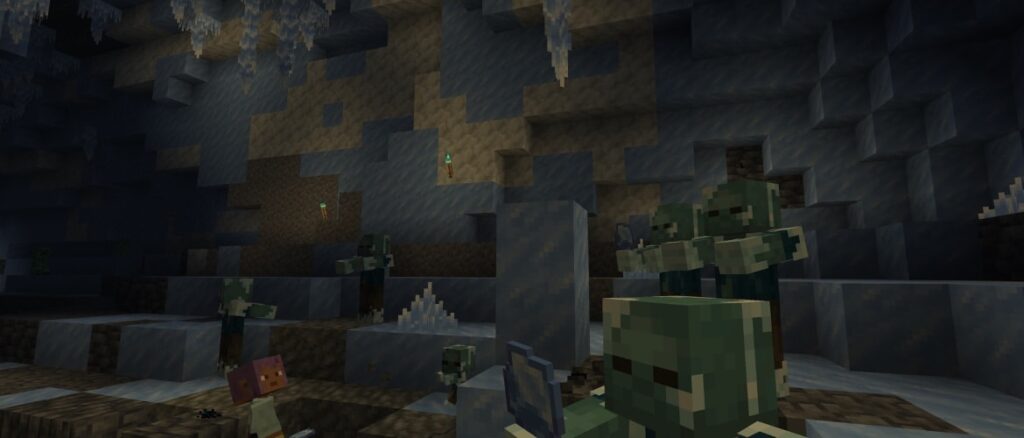
Brr! Does it feel colder all of a sudden? Minecraft LIVE revealed the first look at our next game drop – and it’s frosty. Explore ice caves filled with glittering icicles and ice crystals, plus meet a not-so-chill new hostile mob! This frozen zombie variant is well adapted to colder conditions and can freeze players with its attacks. We’re super excited to hear what you think about the new features. Make sure to visit our feedback site at https://aka.ms/mc-gamedrop_winter26 and leave your thoughts!
Beyond the frozen depths, we’ve also made a number of improvements to Friends! The Friends list has received a refreshed design, along with new search and sorting options to make it easier to find, organize, and manage your friends. So grab your friends and explore!
Happy ice-caving!
New Features
Added the new Ice Caves BiomeAdded Ice CrystalsAdded IciclesAdded the Frostbite mobAdded the Freezing mob effectAdded the Ice Ball
Ice Caves
The Ice Cave is a new cave biome that can generate under the colder biomes in the OverworldIt consists mainly of Packed Ice and CalciteIcicles generate hanging from the ceilingLarge Icicles made of Packed Ice generate on the ground and hanging from the ceilingPatches of Snow occasionally generate on the groundOres generate embedded in pockets of Stone and DeepslateGlow Lichen does not generate in this biomeIn addition to the mobs that normally spawn in caves, Strays and Frostbites can also spawn hereIce Crystals occasionally generate on the ground
Ice Crystal
A new crystal-like block similar to Amethyst ClustersBreaks if the support block is removedIt emits light and can be placed in any direction
Icicle
A new speleothem-like block similar to Dripstone and Sulfur SpikesIcicles can be found all over the ceiling of ice cavesCan naturally grow up to 5 blocks long when pointing downwardOnly grows in areas without nearby light sources and outside the NetherIt can be placed in any direction and has a base, middle and tip variantDamages entities when it falls and deals extra damage to entities that land on itPointed blocks break when exposed to nearby light sources or when placed in the Nether
Frostbite
The Frostbite is a zombie variant that can throw Ice BallsSpawns in cold/icy biomesSwitches between melee and ranged combat based on target distance and whether they have Ice BallsMelee attacks apply Freezing, while ranged attacks throw Ice BallsTransforms into a Zombie when underwater for long enoughDrops Rotten Flesh and Ice BallsIt can stand on top of Powder SnowIt is immune to freezing and does not get slowed by the Freezing effect or Powder SnowZombies and Husks transform into Frostbites when inside Powder Snow
Freezing Mob Effect
The Freezing effect will cause players to shake and eventually deal damageCauses those affected to slowly become frozen as if in Powdered Snow for its durationLeather Armor protects from freezing, just like with Powder Snow, but will not keep the effect from being applied and will not remove the effectMobs will take additional damage from Freezing while they are affected by this effectMobs that are vulnerable to Freezing have a five times multiplier to the damage taken
Lingering Potion, Splash Potion, and Potion of Freezing can be brewed using Ice BallsArrows of Freezing can be crafted by placing a Lingering Potion of Freezing in the middle of the crafting table surrounded by eight Arrows
Ice Ball
Ice Balls are new projectile used by the FrostbiteThey deal a small amount of damage and have knockbackDeals 4 damage to entities it hits, scaling down with velocityBreaks on impact with blocks or entities, creating a particle effect and sound
Changes
Minor Tweaks to Blocks, Items and Entities
Snow can now be placed on Packed IceSnowballs now apply knockback to players
UI
Lightmap visualization is now configurable as lightmap_texture in debug options and appears in the Light groupIts visibility setting is saved with the debug profileIt can now be displayed alongside the FPS and network charts
The Social Interactions screen has been replaced with the new Other Players screenThe “Social Interactions” keybind has been renamed to “Other Players”The Friends button has received a new iconThe “Visibility” option has been moved from Online Options into the Friends listThe icon buttons in the pause menu have been reordered to match the main menu
Friends
Updated the design of the Friends listAdded searchingIn the Friends tab, the profile name text box used for sending requests also functions as a search boxIn the requests tab, a search box appears at the top if you have 15 or more requests
Added sortingSort modes can be cycled through by pressing the new sort buttonThe current sort modes are:Sort by who’s online – friends who are listed as online appear at the top of the listSort by alphabetical order – friends are sorted according to the alphabetical order of their names
Clicking on a player’s icon in the Friends list now opens their Player OptionsRemoved “Remove Friend” buttonThis functionality is now accessible through Player Options instead
Player Options
Player Options is a new screen accessible through both the Friends list and Other Players.
It contains per-player social actions previously spread across the Friends list and Social InteractionsThese actions are:Sending or canceling a friend requestAccepting or declining a friend requestMuting a playerReporting a player
Muting a player hides their chat messages until the next time you start the gameBlocking players is managed through Other Players
Other Players
Other Players is a new menu which has been added to replace Social Interactions.
Other Players is only available when playing on a world open to multiplayerThis includes:Playing in singleplayer worlds open to LANPlaying on dedicated serversPlaying on Realms
It can be opened by pressing the “Other Players” icon button in the pause menuIt can also be opened from in-game using the “Other Players” key (‘P’ by default)
It lists the players currently online in the world you are inIt lists players who are not online anymore, but may still be of interest:Players who were just online but leftPlayers who recently sent messages in the chat
Clicking on a player’s icon in the list opens their Player Options
Player Reporting
Redesigned the save/discard draft confirmation screenPlayer reports saved as drafts no longer prompt you to discard them upon exiting a world if they can be continued laterChat reports can never be continuedName reports can be continued if the reported player is in your Friends listSkin reports can be continued if the reported player is in your Friends list
Pressing “Quit Game” in the main menu will now give a warning if you have an unsent draft report that would be lost
Debug Overlay
A new chunk_section_status shows the rendering status of chunks around you. This will impact performance at high view distances.The chunk load overlay has been split off from visualize_chunks_on_server and into a new chunk_load_status
Technical Changes
The Data Pack version is now 123.0The Resource Pack version is now 100.0
Data Pack Versions 122.0 through 123.0
World Generation
Features
Changed minecraft:speleothem_cluster
Added placement_options – a field that contains various settings for the placement of the Speleothem cluster:placement_mode – represented by an enum that is one of floor_and_ceiling, floor_only, ceiling_onlybase_block_transformer – sets a state on the base block of the Speleothem blocknone – the regular base block state used in Sulfur Spikes and Dripstone Spikesset_attached – the state of the base block of the Icicle when it is attached to a surface
allow_water_placement – boolean indicating whether the Speleothem can be placed in water or not
Changed minecraft:large_dripstone (renamed from minecraft:large_speleothem)
Added field base_block – Block State Provider, the block to build the large dripstone out of
Noise Settings
Feature Placements
Added the following Ore Placements:ice_cave_ore_coal_upperice_cave_ore_coal_lowerice_cave_ore_copperice_cave_ore_diamondice_cave_ore_diamond_mediumice_cave_ore_diamond_largeice_cave_ore_diamond_buriedice_cave_ore_iron_upperice_cave_ore_iron_middleice_cave_ore_iron_smallice_cave_ore_goldice_cave_ore_gold_lowerice_cave_ore_lapisice_cave_ore_lapis_buriedice_cave_ore_redstoneice_cave_ore_redstone_lowerice_cave_ore_andesite_upperice_cave_ore_andesite_lowerice_cave_ore_diorite_upperice_cave_ore_diorite_lowerice_cave_ore_gravel
These are all identical to their non-ice-cave counterparts, only that they place a patch of stone or deepslate (depending on y-level) before placing the ore itselfThey can replace Ice and Calcite as well
Block Sound Sets
Added minecraft:block_sound_set registry containing definitions for sounds produced by different categories of blocks.
Format: object with fields:
volume – a float between 0.00001 and 10.0, the relative volume at which all sounds will be playedIf not present, defaults to 1.0
pitch – a float between 0.00001 and 2.0, the relative pitch at which all sounds will be playedIf not present, defaults to 1.0
break_sound – Sound Event, the sound that will be played when the block gets brokenstep_sound – Sound Event, the sound that will be played when an entity walks on top of the blockplace_sound – Sound Event, the sound that will be played when the block gets placedhit_sound – Sound Event, the sound that will be played while the block is being destroyedfall_sound – Sound Event, the sound that will be played when an entity falls onto the blockAll sound fields are optional
Tags
Block Tags
Added block tag ice_cave_ore_replaceables to describe all blocks which are allowed to be replaced by ores within Ice Caves (in addition to stone_ore_replaceables, height_specific_ore_replaceables and deepslate_ore_replaceables)Added block tag melts_icicle_above to describe all blocks causing Icicles directly above to meltAdded block tag large_icicle_replaceable to describe all blocks which are allowed to be replaced by Large Icicles within the Ice Caves biomeAdded several block tags to affect how mobs pathfind:#pathfinding/avoid_in_air – blocks to be avoided while flying, either due to danger our potential to get stuck#pathfinding/damage_cautious – blocks that will damage entities that walk through them, but are not considered dangerous enough to avoid entirely#pathfinding/damaging – blocks that will damage entities that walk through them#pathfinding/drop_down – blocks that can be dropped down through#pathfinding/leaves – blocks that are considered leaves#pathfinding/open – blocks that are considered completely open to walk through#pathfinding/powder_snow – blocks that are considered powder snow#pathfinding/rails – blocks that are considered rails#pathfinding/sticky – blocks that are considered sticky, causing slowed movement and inability to jump
Item Tags
Added #frostbite_preferred_weapons for items picked up and used by the FrostbiteAdded #knocks_back_players_even_with_zero_damage for items which shall apply knockback even if they do 0 damageAdded #sheep_wool_dyes – items that can be used to dye a Sheep’s woolThe color will be taken from the minecraft:dye component of the used item stack
Biome Tags
Added #spawns_strays_without_powder_snow to describe all biomes which allow the spawning of strays without requiring powder snow on the surface above them
Block Sound Set Tags
Added #sounds_wooden – block sound sets which when stepped on cause Horses to produce a galloping sound
Particles
Removed particle type minecraft:item_snowball
Added minecraft:freezing
Emitted by Entities which are affected by the Freezing mob effectHas no fields
Resource Pack Versions 98.0 through 100.0
Block Sprites
Added new Block texture:
Added new Block textures:block/ice_crystal.pngblock/icicle_down_base.pngblock/icicle_down_frustum.pngblock/icicle_down_middle.pngblock/icicle_down_tip.pngblock/icicle_down_tip_merge.pngblock/icicle_side.pngblock/icicle_top.png
Item Sprites
Added new Item texture:
Added new Item texture:item/frostbite_spawn_egg.pngitem/ice_ball.pngitem/ice_crystal.pngitem/icicle.png
UI Sprites
Added new UI textures:mob_effect/freezing.pngfriends/background_light.pngfriends/presence_all.pngfriends/presence_limited.pngfriends/presence_none.pngfriends/profile.pngfriends/profile_highlighted.pngfriends/sort_alphabetical.pngfriends/sort_presence.pngfriends/tab_selected.pngpause_menu/other_players.png
The following textures have been renamed:friends/button.png -> friends/tab.pngfriends/button_highlighted.png -> friends/tab_highlighted.pngfriends/loading.png -> widget/loading.pngpause_menu/social_interactions.png -> pause_menu/feedback.png
The following textures have been removed:friends/button_disabled.pngfriends/remove.pngpause_menu/player_reporting.pngtoast/social_interactions.png
Entity Textures
Added new Entity textures:entity/zombie/frostbite.pngentity/zombie/frostbite_baby.pngentity/zombie/frostbite_outer_layer.png
Sounds
Added new sound events:entity.frostbite.ambiententity.frostbite.deathentity.frostbite.hurtentity.frostbite.stepblock.ice.breakblock.ice.fallblock.ice.hitblock.ice.placeblock.ice.stepblock.ice_crystal.breakblock.ice_crystal.fallblock.ice_crystal.hitblock.ice_crystal.placeblock.ice_crystal.stepblock.icicle.breakblock.icicle.fallblock.icicle.hitblock.icicle.placeblock.icicle.stepblock.icicle.landentity.ice_ball.breakentity.ice_ball.throw
Particles
Added new Particle textures:particle/freezing_0.pngparticle/freezing_1.pngparticle/freezing_2.pngparticle/freezing_3.pngparticle/freezing_4.pngparticle/freezing_5.png
Item Models
Block Models
Added new Block Models:block/icicleblock/icicle_base
Fixed bugs in 26.4 Snapshot 3
MC-212616 – The dye staining sound does not play when dyes are used on tamed wolves or catsMC-303468 – Pets can be teleported to the incorrect coordinates when going through a nether portalMC-306017 – The main arm doesn’t swing when making a tamed wolf sit or stand while holding a dye matching its collar colorMC-307830 – The game’s framerate is limited to 20 fps with the Vulkan rendering backend on some systemsMC-308037 – Unselected tabs in the friends menu show white text instead of grayMC-308051 – The icons on several buttons do not adhere to the UI pixel gridMC-308747 – The social interactions button in the game menu is grayed out in LAN worlds with no playersMC-308994 – The Chat Restrictions screen does not display Xbox communication settings that affect the chatMC-309896 – The options.allowFriendRequests.tooltip and options.inGameNotification.tooltip strings lack a period, unlike similar stringsMC-309906 – The term “Friends List” is inconsistently capitalized across stringsMC-310124 – Leaving a menu that was opened using the keyboard doesn’t select its button from the previous screenMC-310237 – The gui.friends.error.generic string uses an em dash, unlike similar stringsMC-310854 – The buttons in the friends screen have inconsistent outlinesMC-311932 – The Caps Lock key can no longer activate sprinting, sneaking, etc. when the control in question is set to “Hold”MC-311963 – The subtitles.block.poplar_leaves.ambient string uses a present participle instead of the present tense, unlike similar stringsMC-312120 – Enabling the “Exclusive Fullscreen” option while the game is windowed and then entering non-exclusive fullscreen does not update the “Exclusive Fullscreen” option’s button to “OFF”MC-312198 – Almost no small mushrooms generate on mushroom islands anymoreMC-312213 – The game crashes when using custom Superflat presets containing air
Get the Snapshot
Snapshots are available for Minecraft: Java Edition. To install the Snapshot, open up the Minecraft Launcher and enable snapshots in the “Installations” tab.
Testing versions can corrupt your world, so please backup and/or run them in a different folder from your main worlds.
Cross-platform server jar:
Report bugs here:
Want to give feedback?