
Some information:
If you just need to see a list of mods with the ability to open their page in another browser tab – to view at the information in the next sentence; if not, skip this sentence and scroll down:
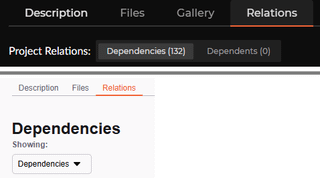
If the modpack you're using is published on CurseForge, you could view a list of mods on the page of the modpack you've selected in the "Relations" tab, mods included in the modpack will be shown in the "Dependencies" section.
Getting mod names as text:
Using the "Photos" app (Microsoft).
Steps:
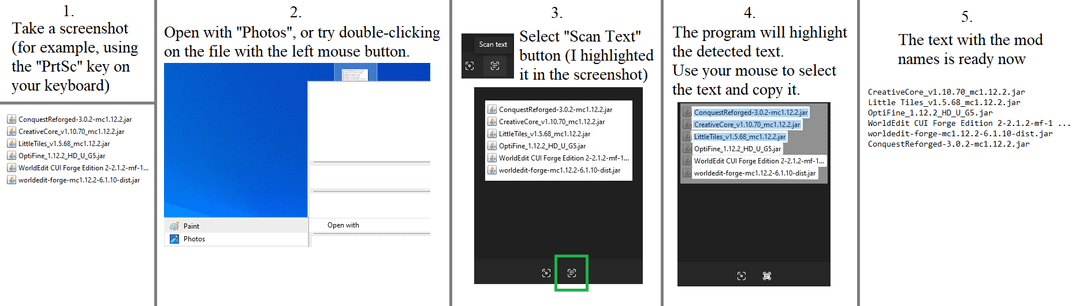
1) Take a screenshot (for example, using the "PrtSc" key on your keyboard) where the mod names in the mods folder will be visible.
2) Open the file using the "Photos" app (Microsoft).
3) At the bottom center, there will be two buttons: "Search with Bing" and "Scan Text".
Select the "Scan Text" button.
4) The program will highlight the detected text. Then, use your mouse to select the text and copy it.
5) The text with the mod names is ready now. You could use it, for example, to paste it into comments or the post description, when you ask which mod adds certain objects, structures etc.
P.s. Don’t close the image until you have pasted the text into a text document or other text field. Because if you close the “Photos” app prematurely, the text will disappear from the clipboard and you will have to copy the text again.
Tips:
1. If the image has too much unused text, you could crop it using a graphic editor like the "Paint", or use the "Scissors" app to select only the area you need.
But if you only need to copy text from an image, this tip is generally not necessary.
2. If you couldn't post a comment with a mod list, then perhaps you could add an image with the mod list at the end of the post.
3. Please, try not to use photos taken with your phone, if you could take a screenshot using the "PrtSc" button (in the other words: if you have the option to use screenshot via a button on your keyboard, please use it).
Because photos taken with a phone could be a bit blurry or may not be readable by text-on-image apps.
P.s.s. I chose the "I made something" tag because this post is supposedly a guide, so it's probably appropriate, since it's a guide. I didn't choose the "Discussion" tag because this is just a guide. But if I need to change the tag, I'll try to do it.
by Nukio_N